
Introduction — The Night AI Became Personal
A founder friend once told me about the moment AI truly changed his life:
“The day I trained ChatGPT on my own data… it felt like I cloned myself.”
Every repetitive task he used to do — answering FAQs, writing onboarding emails, explaining features to new hires, describing processes, documenting knowledge — suddenly had a second brain handling it.
ChatGPT wasn’t giving generic answers anymore.
It was answering like him.
Using his tone.
His reasoning.
His documentation.
His examples.
That night, he understood a truth most beginners miss:
Training ChatGPT with your data isn’t about teaching AI — it’s about unlocking the intelligence you already built over years.
This guide shows you exactly how to do the same.
What “Training ChatGPT With Your Data” Really Means
Most people think “training” means:
- building custom models
- training neural networks
- using GPUs
- writing ML pipelines
But beginners don’t need any of this.
Training ChatGPT simply means:
✔ Letting the model access your data
✔ Teaching it your voice, logic, and examples
✔ Making it answer exactly the way your product or business does
There are three simple methods:
- RAG (Retrieval-Augmented Generation) → Best for 95% of use cases
- Fine-tuning → Best for tone/style imitation
- Few-shot prompting → Best for predictable formatting
Let’s break them down visually.
How ChatGPT Uses Your Data (Beginner-Friendly Diagram)
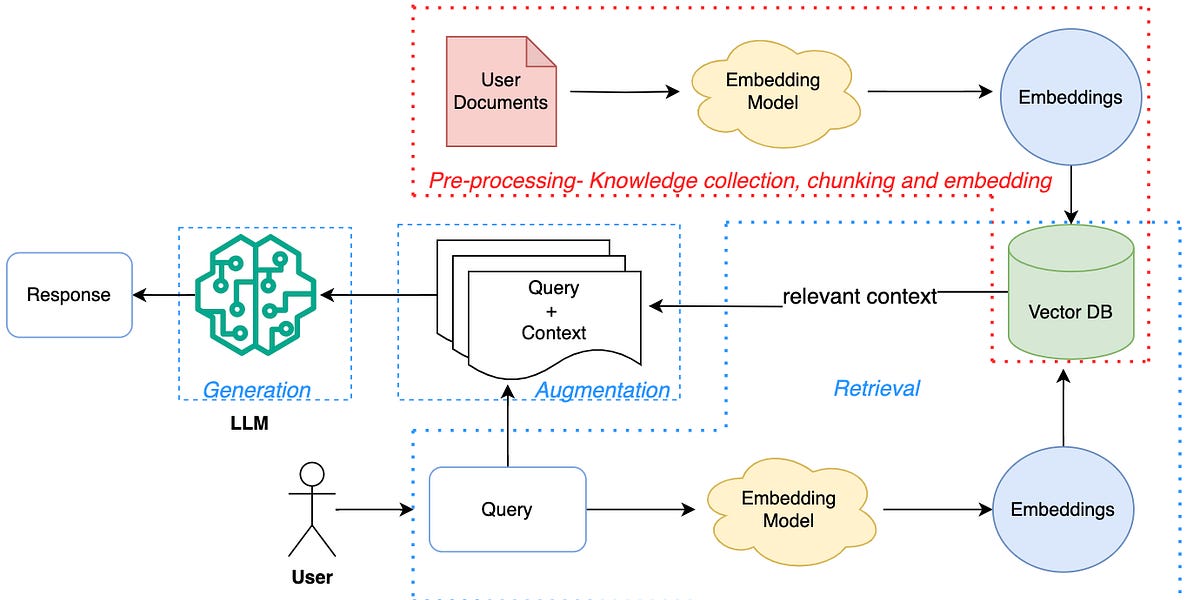
AI-powered Retrieval-augmented Generation (Rag) System
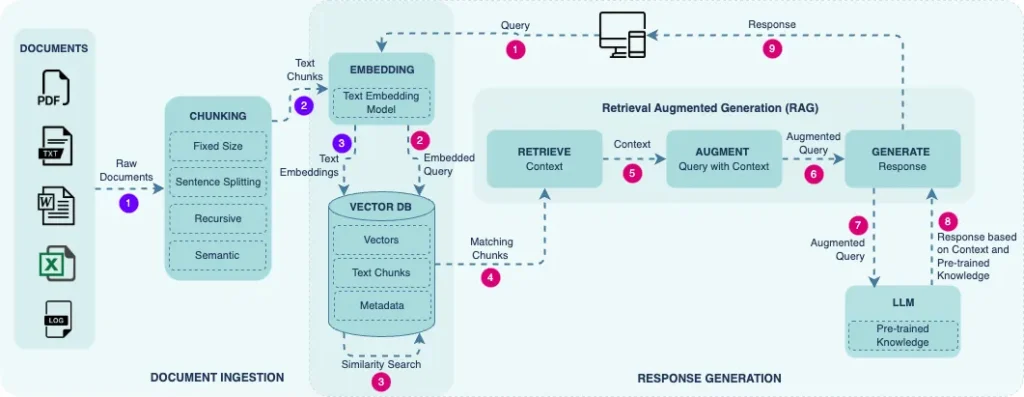

Diagram showing how ChatGPT retrieves your documents, processes chunks, and generates an answer using your data.
This is RAG the foundation of most AI apps today.
Method 1: RAG — The Best Way to Train ChatGPT With Your Data
RAG works by:
- breaking your documents into chunks
- storing them in a vector database
- retrieving relevant chunks when a question is asked
- letting ChatGPT answer using only those chunks
This means the model becomes:
✔ Accurate
✔ Grounded
✔ Hallucination-free
✔ Always up-to-date
What Type of Data Works Best for RAG?
ChatGPT works extremely well with:
- FAQs
- support articles
- onboarding manuals
- SOPs
- product documentation
- sales scripts
- CRM notes
- legal policies
If humans read it to gain knowledge, RAG can train on it.
How Much Data Do You Actually Need?
Beginners assume they need thousands of documents.
You don’t.
Even 5–10 high-quality documents can create a powerful assistant.
Rule of thumb:
📌 Quality > Quantity
📌 Short, clear, structured text > long messy documents
RAG Training Example: Using Your FAQ PDF
from openai import OpenAI
client = OpenAI()

response = client.chat.completions.create(
    model="gpt-4o-mini",
    messages=[
      {"role": "system", "content": "Answer using only the provided FAQ."},
      {"role": "user", "content": "FAQ: <text here>\n\nQuestion: How do refunds work?"}
    ]
)

print(response.choices[0].message["content"])
Sample Output:
“We offer a 14-day refund period. Submit your request with your order ID.”
This is how support bots trained on your KB work behind the scenes.
How RAG Works (Detailed Step-by-Step Diagram)

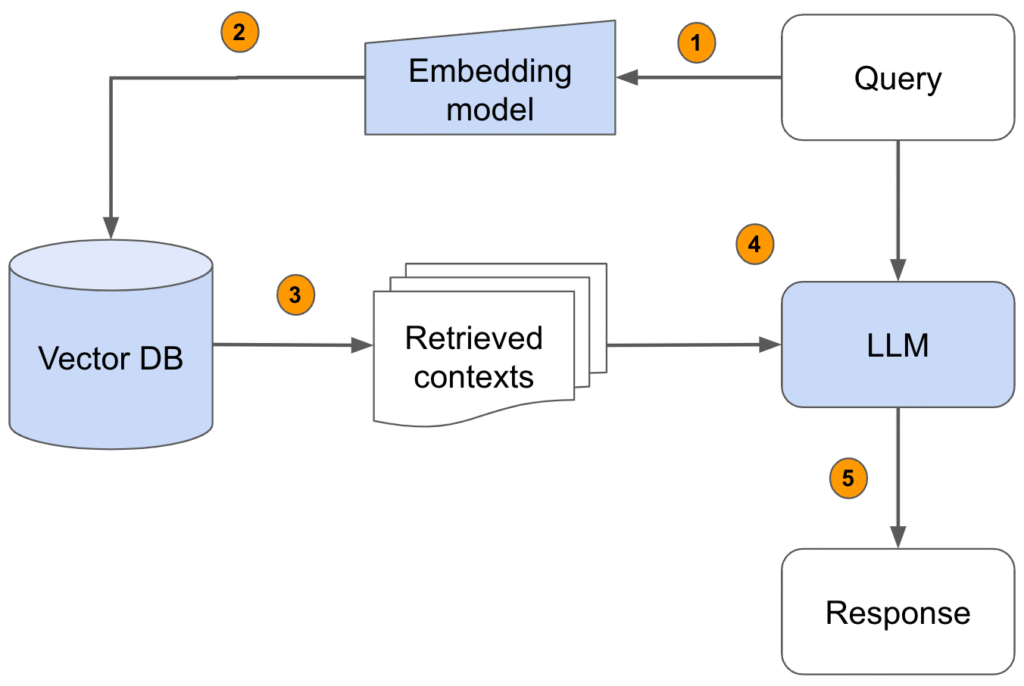

Alt text: Diagram showing chunking → embeddings → vector DB → retrieval → ChatGPT answer.
This is the flow used by most modern AI search bars and knowledge assistants.
Method 2: Fine-Tuning ChatGPT (When You Want It to Speak in Your Voice)
Fine-tuning is perfect when you want ChatGPT to imitate:
- your writing style
- your tone
- your formatting
- your explanations
Unlike RAG, fine-tuning doesn’t give ChatGPT new knowledge — it teaches ChatGPT how to respond.
Fine-tuning vs RAG (Perfect Beginner Visual)
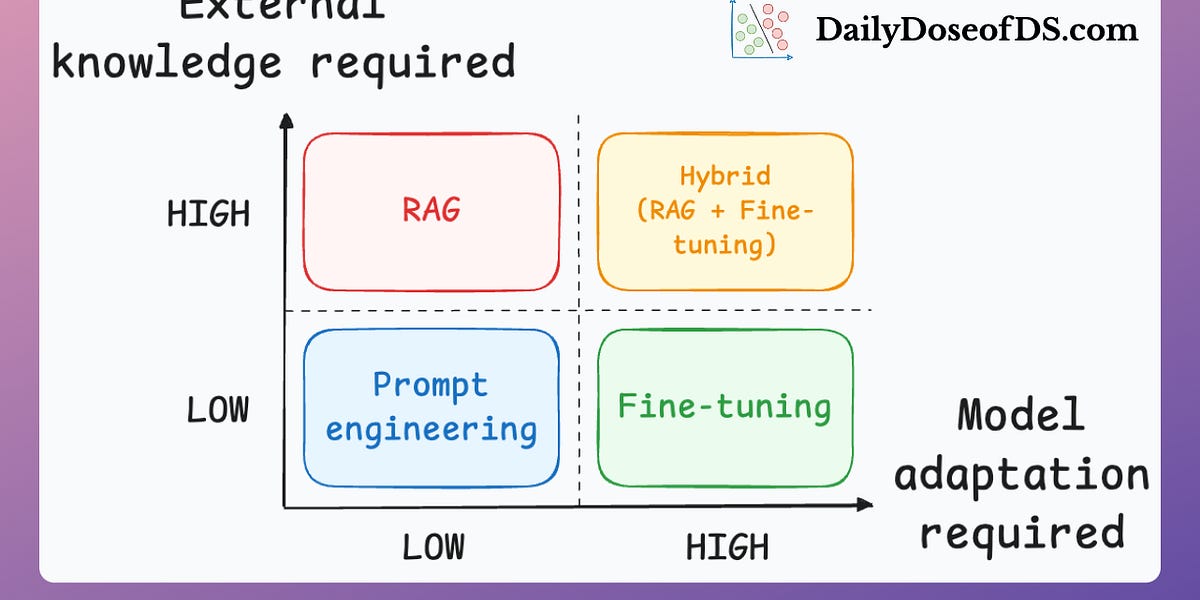

Alt text: Diagram comparing RAG vs fine-tuning showing differences in knowledge source and behavior shaping.
| Feature | RAG | Fine-Tuning |
|---|---|---|
| Updates with new docs | ✅ Yes | ❌ No |
| Uses your data directly | ✅ Yes | ❌ No |
| Learns your tone/style | ⚠️ Partially | ✅ Perfect |
| Best for support bots | YES | Maybe |
| Best for writing like you | No | YES |
For beginners:
Start with RAG → Only fine-tune when you want consistent tone.
Method 3: Few-Shot Prompting (Training ChatGPT With Examples Only)
Few-shot prompting is training by example.
You show ChatGPT:
- how you write
- how you answer
- how you think
Example:
"You answer like this:

Q: Customer asks about refund
A: Provide steps + link + timeline.

Q: Customer asks about scheduling
A: Provide availability + booking link.

Now answer: <new question>"
ChatGPT now follows your structure every time.
How Few-Shot Prompting Works (Visual)

Alt text: Diagram showing how examples influence model output shape and tone.
What Makes a Good Training Example?
Great examples have:
- clear question
- clear answer
- consistent tone
- structured formatting
- predictable steps
Bad examples confuse the model quickly.
Mini Case Study — How a Support Team Trained ChatGPT on Their SOPs
A SaaS company had a 60-page Support SOP manual.
Their team spent hours answering:
- refund questions
- appointment issues
- setup steps
- billing disputes
After training ChatGPT with their SOP:
✔ 37% reduction in repetitive queries
✔ 51% faster internal responses
✔ 22% increase in CSAT for “resolution clarity”
✔ New hires learned the product 60% faster
Their AI assistant didn’t eliminate support — it supercharged it.
Before vs After Training ChatGPT With Your Data
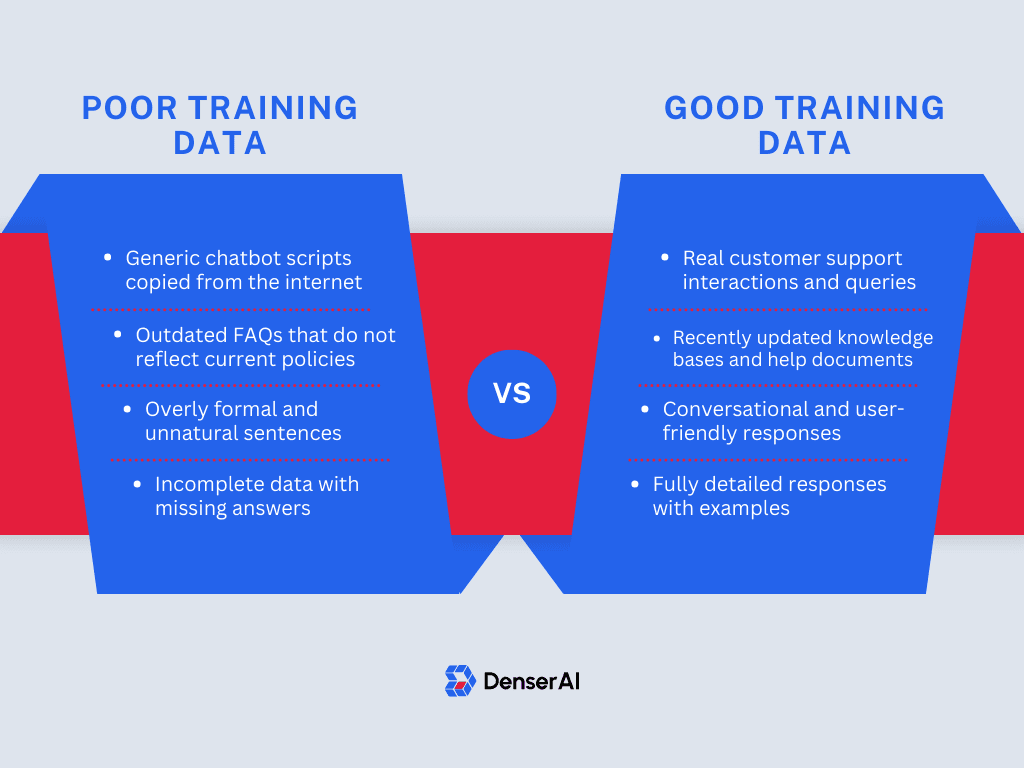

Alt text: Before vs after training ChatGPT showing accuracy and personalization differences.
| Before Training | After Training |
|---|---|
| Generic answers | Personalized answers |
| Hallucinations | Grounded responses |
| Inconsistent tone | Brand-consistent tone |
| Manual work | Automated workflows |
| User confusion | User clarity |
Step-by-Step Guide: How to Train ChatGPT With Your Data
1. Collect Your Data
Start with:
- FAQs
- onboarding docs
- internal knowledge
- product descriptions
2. Chunk Your Data
Split documents into:
- 200–500 word pieces
- semantically meaningful paragraphs
3. Create Embeddings
embedding = client.embeddings.create(
  model="text-embedding-3-large",
  input="Sample text block"
)
4. Store in a Vector Database
Use:
- Pinecone
- Supabase
- Weaviate
- ChromaDB
5. Retrieve & Generate
context = " ".join(top_chunks)

response = client.chat.completions.create(
 model="gpt-4o-mini",
 messages=[
   {"role": "system", "content": "Use ONLY the provided context."},
   {"role": "user", "content": f"Context: {context}\n\nQuestion: {question}"}
 ]
)
❓ FAQ: Common Questions About Training ChatGPT With Your Data
1. Should I combine RAG + fine-tuning?
Yes — this gives you the best of both worlds:
RAG = knowledge
Fine-tuning = tone & structure
2. How do I keep ChatGPT updated as my data changes?
Update your vector database.
RAG makes updates instant — no retraining needed.
3. Do I need a lot of data to train ChatGPT?
No. Even 5–10 well-written documents can produce excellent results.
4. Does ChatGPT store my data?
No. It uses retrieval, not training, unless you explicitly fine-tune.
5. What’s better: PDFs or text files?
Doesn’t matter — as long as you extract and chunk clean text.
6. How often should I update embeddings?
Whenever your docs change — weekly for fast-moving products, monthly for stable ones.
Statistics That Matter
- RAG reduces hallucinations by 80–95%
- Fine-tuning improves tone consistency by 70%
- Support teams cut repetitive queries by 30–50%
- AI onboarding assistants speed training by 2–4×
- RAG is up to 90% cheaper than fine-tuning for dynamic content
Best Practices for Training ChatGPT With Your Data
- Keep chunks small
- Use embeddings, not raw dumps
- Write strict system messages
- Provide examples for tone
- Enforce JSON output when needed
- Always log queries & responses
- Keep your data clean and structured
Conclusion: Your Data Is Your Competitive Edge
When my founder friend trained ChatGPT with his data, he didn’t just automate tasks —
he unlocked the intelligence he had earned over years.
He built a system that thought like him.
Explained like him.
Worked like him.
That’s the power of training ChatGPT with your data.