
Introduction — The Moment AI Truly “Clicked”
A close founder friend once messaged me at midnight:
“I connected ChatGPT to my product. Bro… everything changed in one evening.”
He wasn’t exaggerating.
By sunrise, he had built:
- an AI chatbot
- an AI search bar
- automated customer replies
- a content generation engine
- and a tiny onboarding flow
All powered by one API he had never touched before.
That night wasn’t about the API itself — it was about the moment AI stopped feeling like futuristic hype and became real, useful, and unbelievably accessible.
This guide is designed to give you that same moment — where you go from “I’m curious” → to “I can build this today.”
Let’s begin.
What Is the ChatGPT API?
The ChatGPT API allows your app to send text to a model and receive intelligent responses back.
If you’ve ever used ChatGPT inside the browser, you already understand how it works — the API is simply a programmable version of that intelligence.
You can use it to build:
- conversational chatbots
- AI-powered search
- customer support automation
- content generation tools
- onboarding assistants
- internal developer utilities
- data extraction and transformation scripts
And all of this starts with a simple request.
How the ChatGPT API Works — A Simple Visual
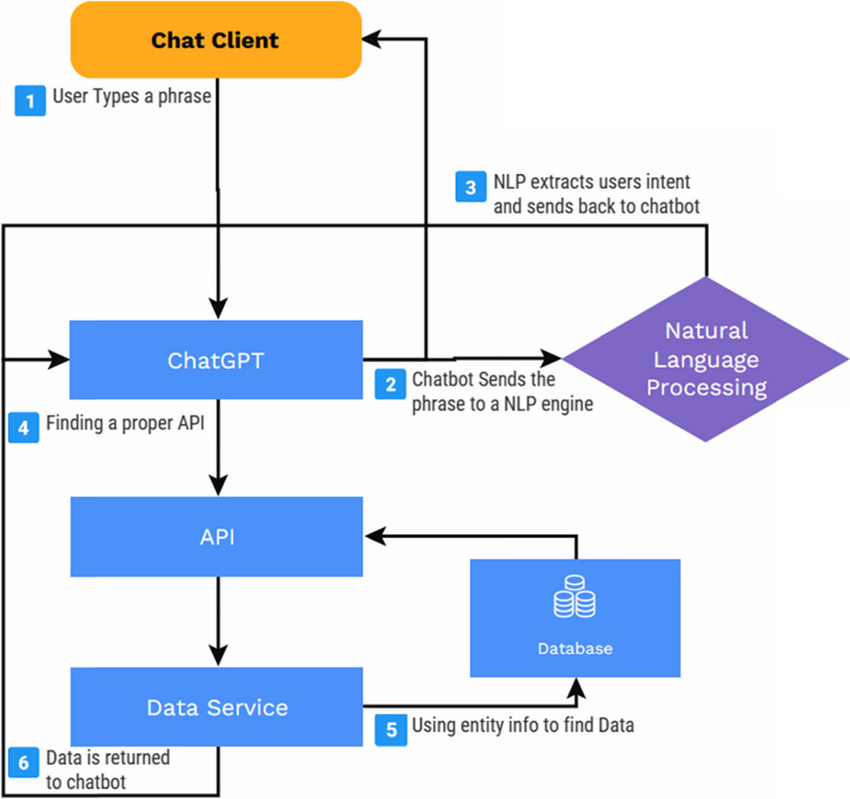
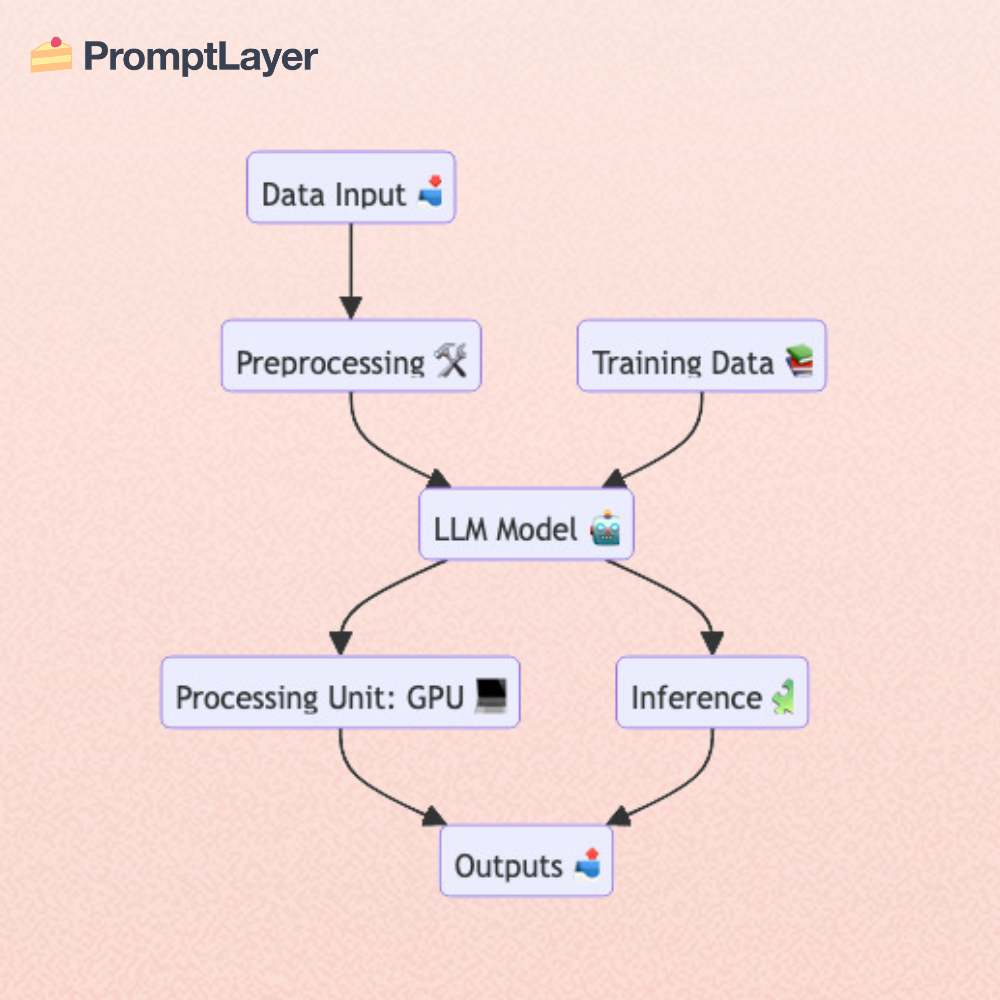
Your system follows a basic loop:
- Your app sends a request with a message
- ChatGPT processes and interprets it
- The model sends back a response
- Your UI presents the answer to the user
This simple cycle powers everything — from chatbots to full-scale AI products.
Getting Started: Your First ChatGPT API Call
Install the library
Python
pip install openai
Node.js
npm install openai
Write your first request
from openai import OpenAI
client = OpenAI()

response = client.chat.completions.create(
    model="gpt-4o-mini",
    messages=[{"role": "user", "content": "Explain AI in one sentence."}]
)

print(response.choices[0].message["content"])
Sample Output
“AI is a system that learns from data to make intelligent decisions automatically.”
That’s the moment most beginners feel:
“Wait… that’s it? I’m really talking to the model?”
And this is where the journey becomes exciting.
The Core Concepts
Choosing the Right Model
When my founder friend started his late-night experiment, he didn’t know which model to pick. He tried multiple versions, testing speed, accuracy, and price.
Here’s the comparison he wished he had:
| Model | Best For | Speed | Cost | Notes |
|---|---|---|---|---|
| gpt-4o | Complex reasoning, coding | Fast | Higher | Highest accuracy |
| gpt-4o-mini | Chatbots, content, search | Very fast | Low | Best value |
| o3-mini | Bulk generation | Very fast | Lowest | Cheapest option |
| Realtime | Live chat, voice | Fast | Variable | Used for streaming AI |
A real cost example
A small request of ~20 tokens on gpt-4o-mini costs about $0.0002.
That means:
5,000 requests = $1
This cost-efficiency is why startups love API-based AI over full-time engineering solutions.
Building Your First AI Feature — Just Like That Night
1. Build a Chatbot
This was the first feature my friend tested — a simple chatbot that could answer support questions.
def ask(query):
    response = client.chat.completions.create(
        model="gpt-4o-mini",
        messages=[
            {"role": "system", "content": "You are a friendly assistant."},
            {"role": "user", "content": query}
        ]
    )
    return response.choices[0].message["content"]
Example Input:
“What’s your refund policy?”
Example Output:
“Our refund policy allows cancellations within 14 days. Let me know if you want the steps!”
That moment — when the bot answered correctly — was the first spark.
2. Build an AI Search Bar (A Game-Changer)
This was the feature that “clicked” for him — and the one that transformed user engagement.
Instead of users searching through long FAQ pages, he passed the FAQ content directly to the API:
await client.chat.completions.create({
  model: "gpt-4o-mini",
  messages: [
    { role: "system", content: "Answer using only the provided content." },
    {
      role: "user",
      content: "Content: <FAQs> \nQuestion: Do you offer refunds?"
    }
  ]
});
Before vs After
| Traditional Search | AI Search |
|---|---|
| Returns links | Returns answers |
| Customer must click & read | Customer gets instant clarity |
| Higher drop-offs | Higher conversions |
Businesses using AI search experiences often see 40–60% more conversions.
This was the moment he realized:
“I didn’t just build a feature — I upgraded the entire product experience.”
3. Extract Structured Data from Text
When he wanted to automate CRM workflows, this simple pattern changed everything:
Input:
Hi, I’m Sarah. My email is sarah@mail.com and my phone is 923492349.
Output (API-generated):
{
  "name": "Sarah",
  "email": "sarah@mail.com",
  "phone": "923492349"
}
This single trick helped him automate hours of manual admin work.
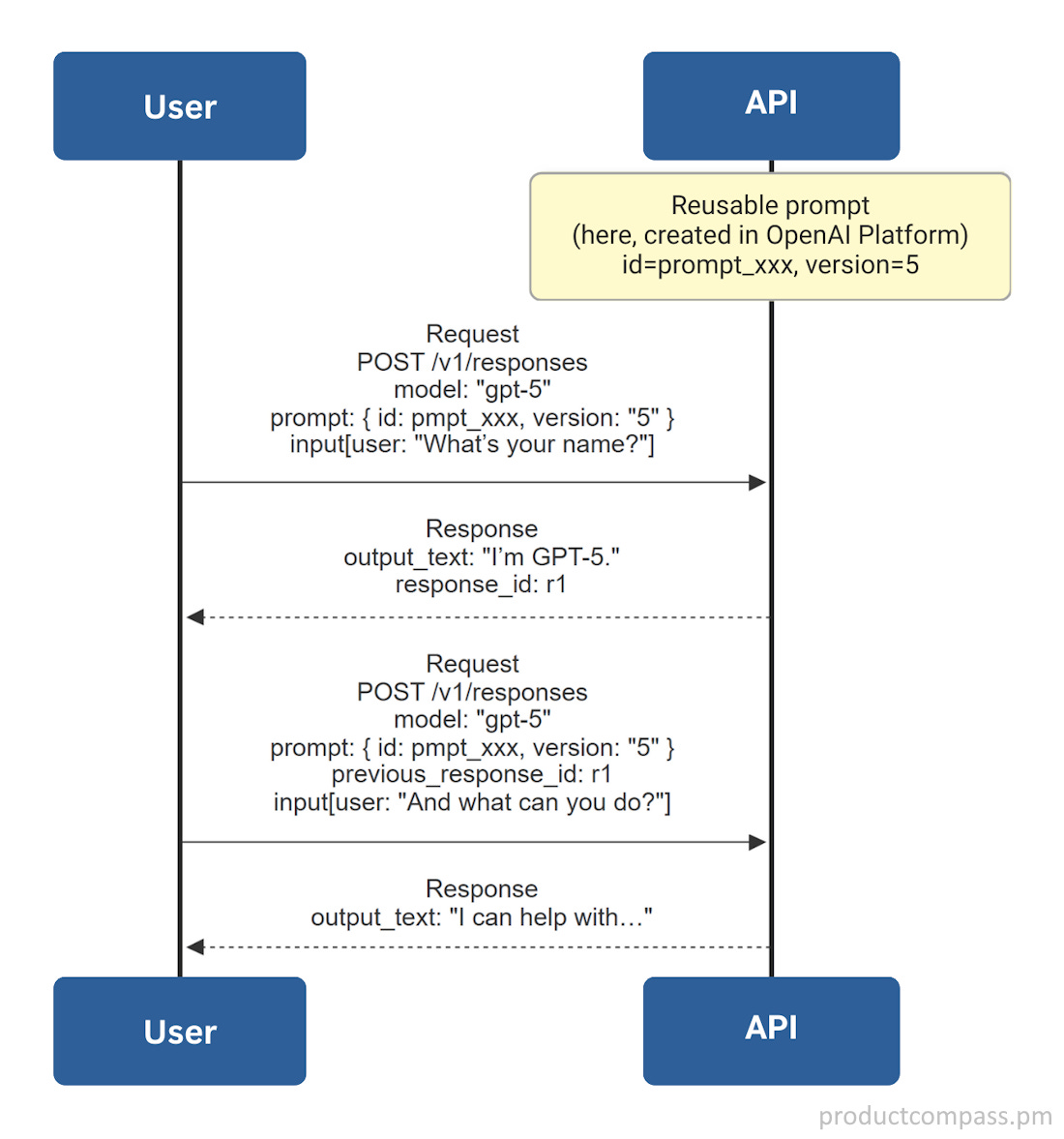
Useful Diagrams for Beginners
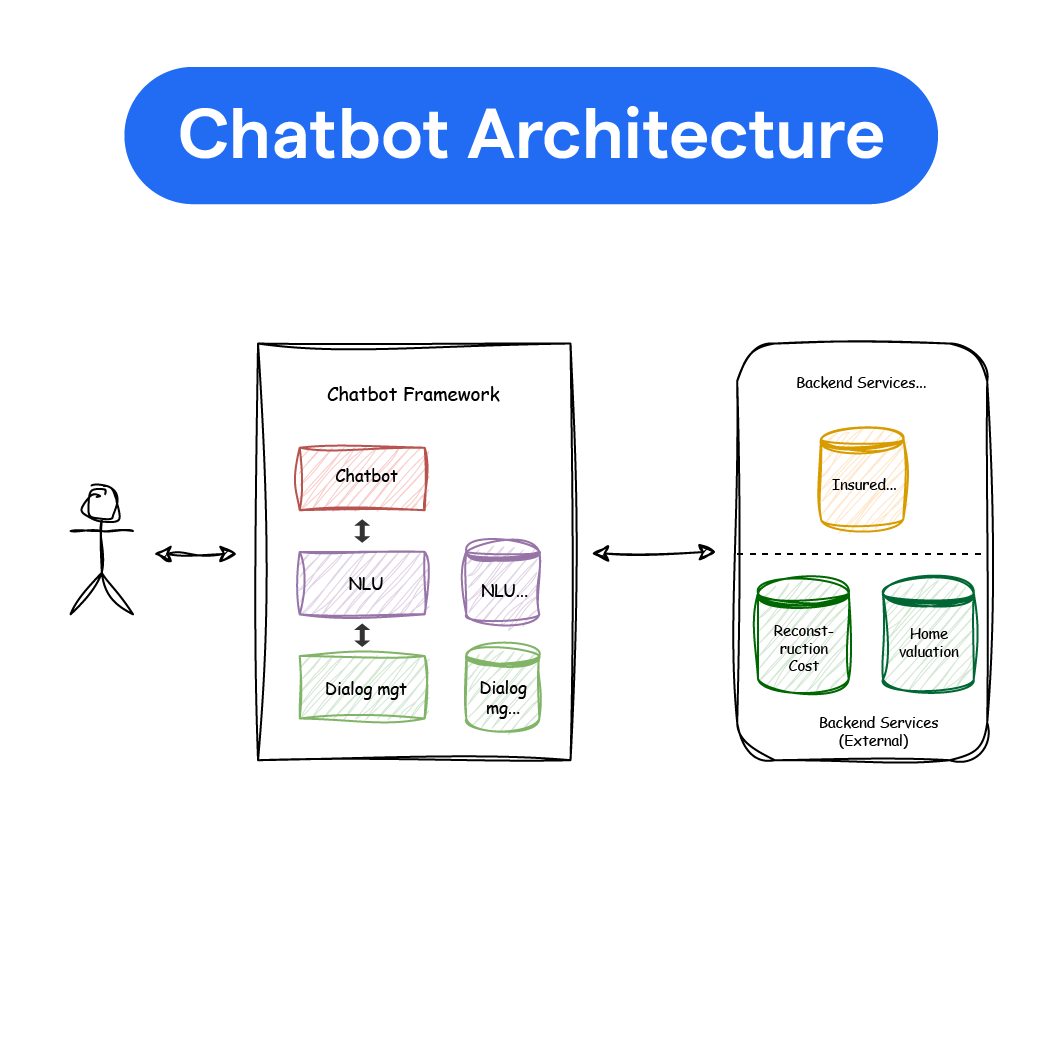
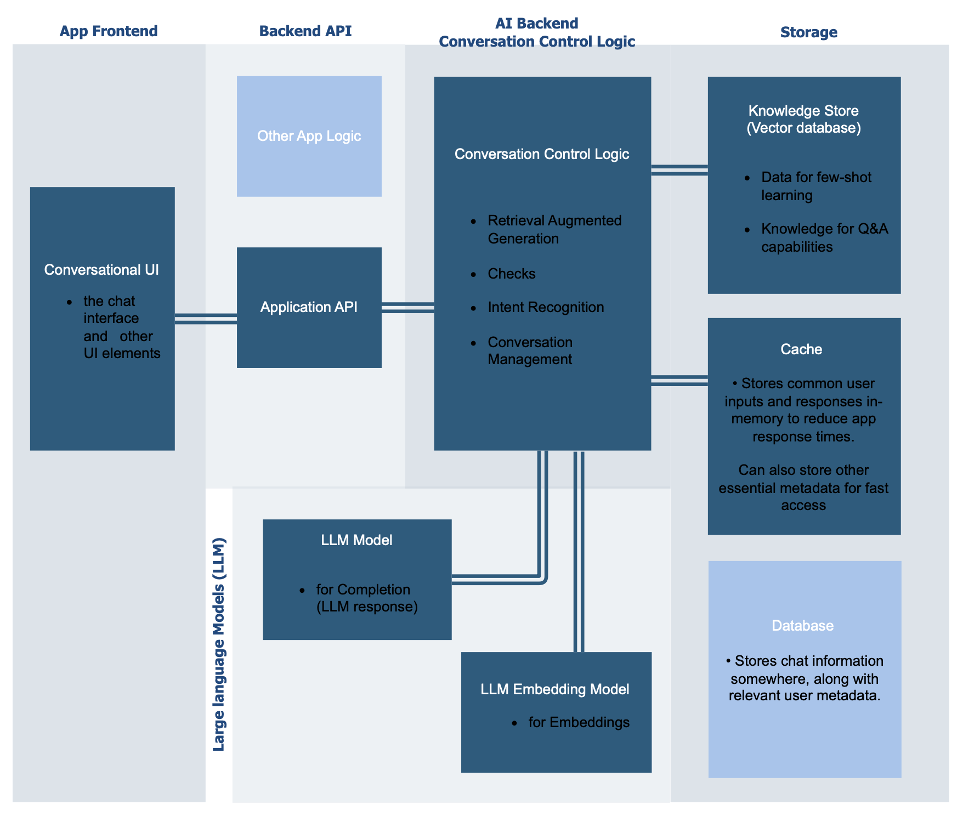
Clear visuals help beginners understand how AI features flow through a system
Statistics That Matter (Based on Industry Data)
- AI-assisted search reduces support workload by 30–45%
- Chatbot resolution time improves by 27–55%
- Developers build prototypes 10× faster using LLM APIs
- gpt-4o-mini is 80–90% cheaper than gpt-4o
- Startups integrating AI workflows save 20–40% in operational costs
These aren’t abstract numbers — these are the metrics determining whether a young product survives or scales.
Best Practices Every Beginner Should Know
- Use system messages to control tone and behavior
- Keep prompts short and focused
- Cache repeated queries to reduce cost
- Add retry logic for rate limits
- Use
max_tokensto avoid unexpected long responses - Log inputs & outputs for debugging and prompt tuning
The Full-Circle Moment
At 4:10 AM that night, my founder friend sent one last message:
“Bro… I didn’t just build features.
I built the future version of my product.”
And that’s the moment AI truly “clicked.”
It wasn’t magic.
It wasn’t complexity.
It was simply understanding how to use the ChatGPT API — and realizing what becomes possible when you do.
Today, you’re standing at the exact same starting point.
Conclusion Your Turn to Build Something Powerful
You now understand how the ChatGPT API works, how to make your first request, and how to build real features like chatbots, AI search, and structured extraction.
The same transformation my friend experienced — clarity, confidence, creativity — is now within your reach.
If you’re ready to build your first full AI-powered product…
Common Mistakes Beginners Make with the ChatGPT API
1. Do I need system messages?
Yes.
Without them, your bot’s tone becomes inconsistent.
System messages act as your global rules.
2. Why shouldn’t I send huge prompts?
They slow down the model, cost more, and lead to less accurate outputs.
Concise prompts → better results.
3. How do token limits affect cost?
Every request = input tokens + output tokens.
To control cost, set:
"max_tokens": 200
4. Why add retry logic?
As usage grows, you will hit rate limits.
Retry logic makes your app reliable.
5. Should I cache repeated questions?
Yes — caching reduces:
- Cost
- Latency
- Duplicate API calls
Huge benefit for FAQs and support bots.
6. Why log prompts and responses?
Logging helps you:
- debug
- improve prompts
- analyze behavior
- optimize flows
Without logs, you can’t improve.