Introduction : The First Time an AI Copilot Feels Like a Teammate
A founder once told me a moment he will never forget:
“I didn’t hire a new employee…
I installed one.”
He was talking about his first AI copilot.
At first, he imagined something like a chatbot.
But what he got instead was a digital teammate that:
- summarized meetings
- wrote emails like his best CSM
- drafted product documentation
- identified customer problems before the team noticed
- helped him make decisions faster
- automated repetitive tasks he hated doing
It didn’t just answer questions —
it worked alongside him.
This guide explains what an AI copilot actually is, how it works, why it’s different from AI agents and chatbots, and how companies are using copilots to transform productivity.
What Is an AI Copilot? (Simple Definition for Beginners)
An AI Copilot is:
An intelligent assistant that works alongside you, understands your context, and helps you complete tasks, make decisions, and stay productive.
An AI copilot does NOT replace you.
It augments your abilities.
It can:
- understand your data
- access your tools
- take actions
- generate insights
- support decision-making
- follow your workflows
- collaborate in real time
Think of it as a smart colleague who is always available.
What Is an AI Copilot? (Context → Reasoning → Assistance)
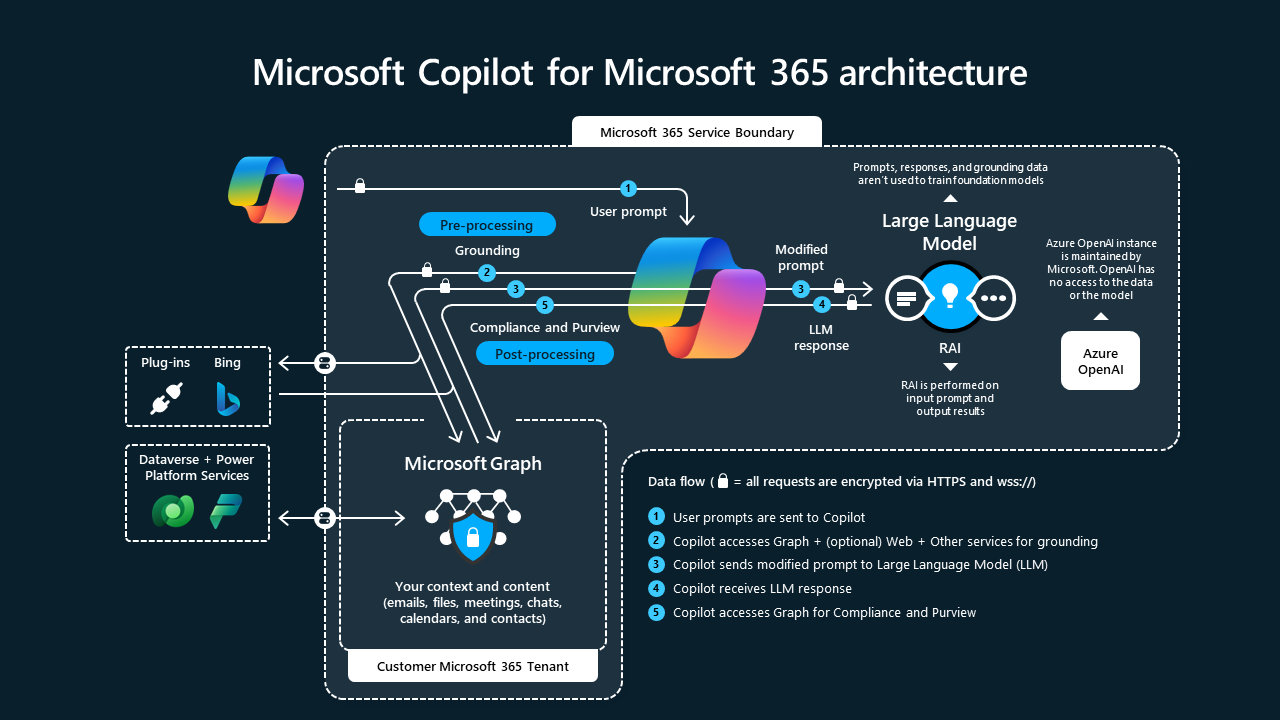

Diagram showing how an AI copilot uses context → reasoning → tools to assist users.
AI copilots combine:
- Context (your data, history, tasks)
- Reasoning (LLM intelligence)
- Tools (actions, APIs, workflows)
How Is an AI Copilot Different From Chatbots & AI Agents?
Chatbot → Answers Questions
Static. Reactive. Requires user prompts.
AI Agent → Takes Actions
Autonomous. Executes workflows.
AI Copilot → Works WITH You
Collaborative. Context-aware. Task-driven.
| Feature | Chatbot | AI Copilot | AI Agent |
|---|---|---|---|
| Answers questions | ✅ | ✅ | ❌ (primary goal is action) |
| Takes actions | ❌ | ⚠️ Some | ✅ Yes |
| Works collaboratively | ❌ | ✅ | ❌ |
| Autonomous workflows | ❌ | ⚠️ Some | ✅ |
| Learns preferences | ❌ | ✅ | ⚠️ Some |
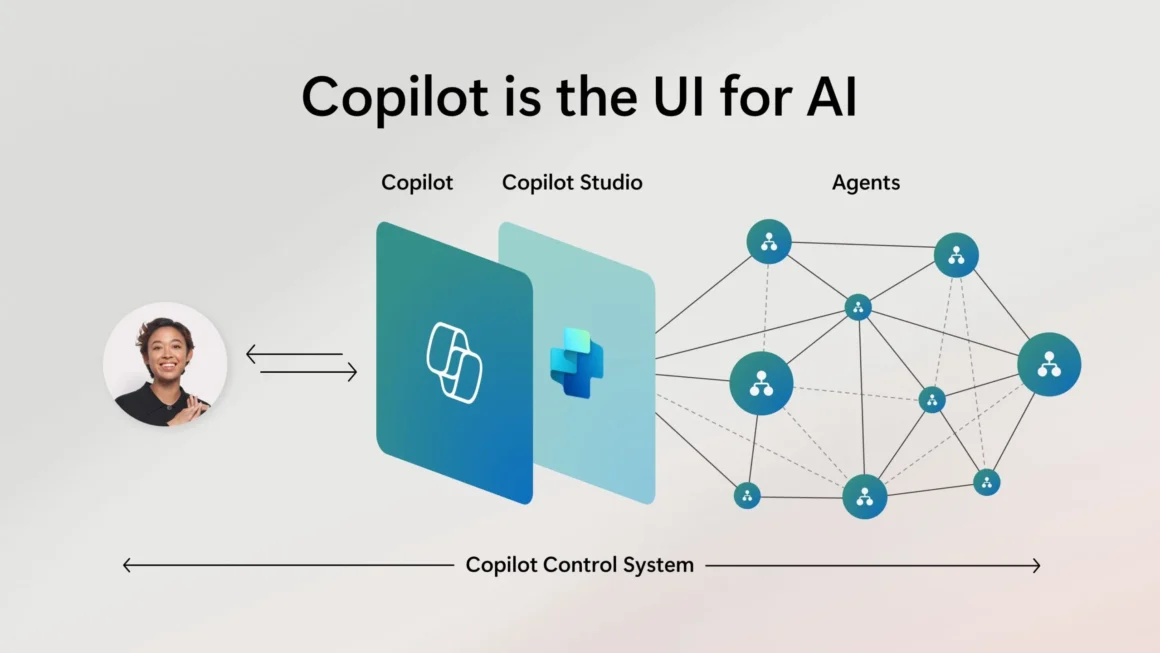
AI copilots sit in the middle:
Helpful like chatbots, capable like agents — but focused on human + AI collaboration.
How an AI Copilot Works (Behind the Scenes)
An AI copilot connects:
- your data
- your tools
- your tasks
- your workflows
Then uses the Observe → Reason → Assist loop to support you.
AI Copilot Workflow: Observe → Reason → Assist

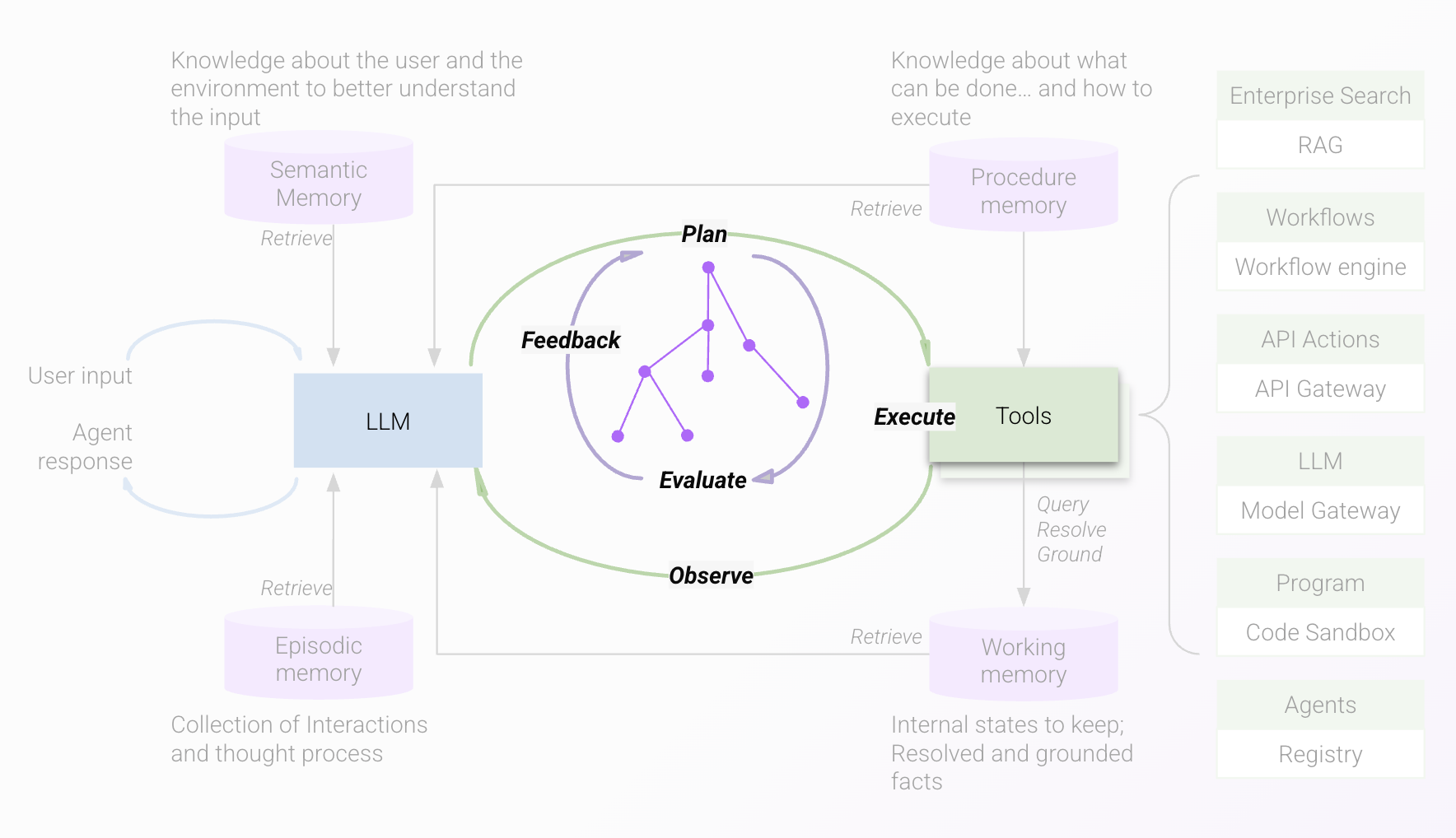
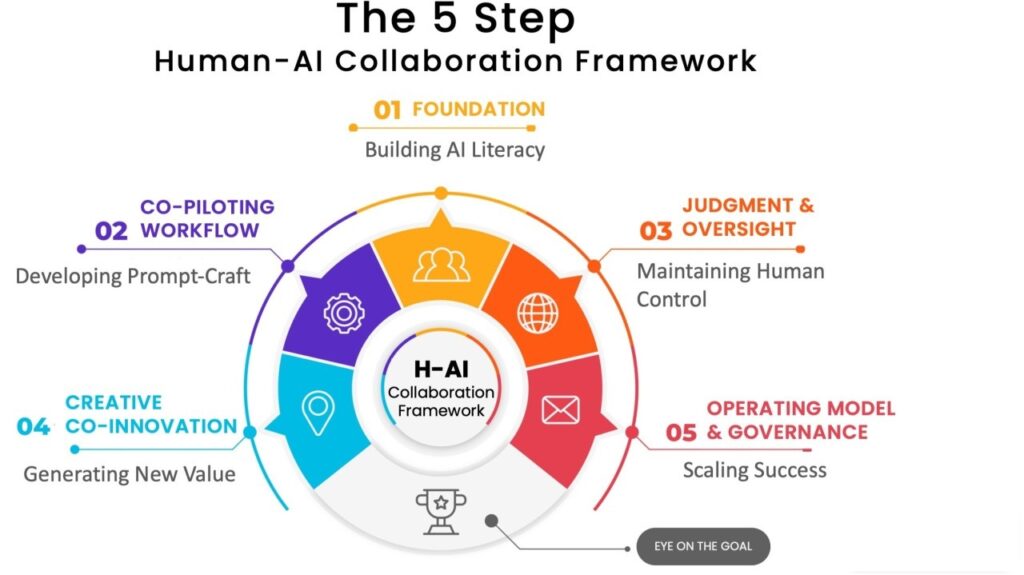
AI copilot workflow diagram showing Observe → Reason → Assist.
Why AI Copilots Are Becoming Essential
Modern teams rely on copilots because they:
- reduce daily workload
- speed up execution
- eliminate repetitive tasks
- act as a knowledge companion
- improve decision-making
- boost productivity by 2×–5×
- prevent mistakes
In short: copilots free you to focus on high-value work.
Real Examples of AI Copilots (Across Industries)
Customer Support Copilot — “Your Real-Time Helper”
Support agents use copilots that:
- suggest replies
- analyze sentiment
- pull customer history
- recommend solutions
- summarize long conversations
- detect frustration
- draft macros automatically
Impact
Agents resolve issues faster and more consistently.
Companies reduce handle time by 25–40%.
Sales Copilot — “Your Personal SDR Assistant”
A sales copilot:
- drafts outreach messages
- researches leads
- summarizes calls
- prepares meeting notes
- creates follow-up plans
- analyzes objections
Sales teams using copilots report:
- 27% more meetings booked
- 33% faster follow-ups
Marketing Copilot — “Your Creative Partner”
This copilot helps teams:
- write copy in brand tone
- generate blog outlines
- repurpose content
- analyze competitors
- create ad variations
- review SEO gaps
It’s like having a strategist + copywriter in one.
Product Copilot — “Your Technical Assistant”
Product teams use copilots to:
- summarize user feedback
- analyze roadmap priorities
- condense Jira tickets
- write technical specs
- identify duplicated feature requests
One company reduced backlog processing time by 60%.
AI Copilot for Founders — “Your Second Brain”
Founders often rely on copilots for:
- summarizing investor calls
- analyzing financial sheets
- rewriting customer messaging
- preparing pitch decks
- understanding complex documents
A startup founder said:
“It feels like having an operator, strategist, and analyst with me every day.”
Before vs After Using an AI Copilot
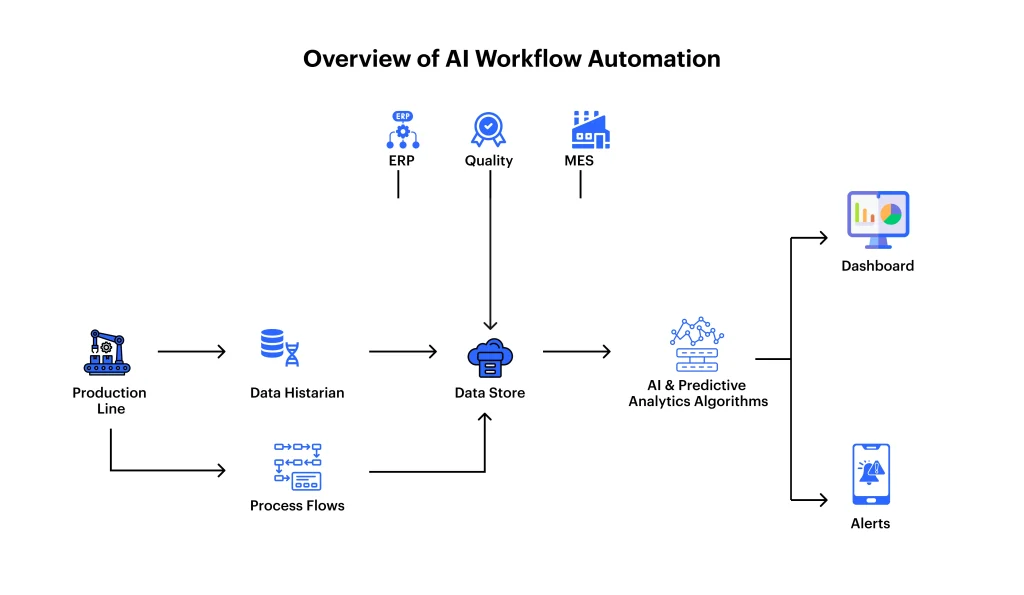
Alt text: Before vs after AI copilot diagram showing productivity improvement.
| Before AI Copilot | After AI Copilot |
|---|---|
| Manual tasks | Automated support |
| Information overload | Clear summaries |
| Slow decisions | Data-backed decisions |
| Repetitive work | Delegated to AI |
| Burnout | Focused productivity |
What Makes a Great AI Copilot?
A great AI copilot must be:
1. Context-Aware
It understands your data, your tasks, your history.
2. Predictive
It helps before you ask.
3. Tool-Connected
It can act — not just respond.
4. Personalized
It mimics your tone, style, preferences.
5. Reliable
It gives accurate, grounded answers.
How AI Copilots Are Built (Tech Breakdown)
AI copilots use:
- LLMs (thinking engine)
- RAG (your data retrieval)
- Embeddings + vector DBs
- Tool integrations (email, CRM, Slack, analytics)
- Memory (preferences, history)
- Actions (scripts & APIs)
Together, these create a powerful collaborative assistant.
Full AI Copilot Tech Stack


AI copilot stack architecture diagram — LLM → Memory → Tools → APIs → Monitoring.
❓ FAQ — Common Questions About AI Copilots
1. Is an AI copilot the same as an AI agent?
No.
An AI agent acts autonomously.
A copilot collaborates with you.
2. Can an AI copilot replace employees?
It replaces tasks, not people.
Teams use copilots to offload repetitive work.
3. Do I need to train an AI copilot with my data?
Yes — this makes it accurate and context-aware.
(Internal link: How to Train ChatGPT With Your Data)
4. Are AI copilots safe for sensitive information?
Yes, if you use enterprise-grade environments with proper controls.
5. Can copilots take actions, or only answer questions?
They can take actions when connected to tools like:
- Slack
- CRM
- databases
- automation workflows
📊 Statistics That Matter
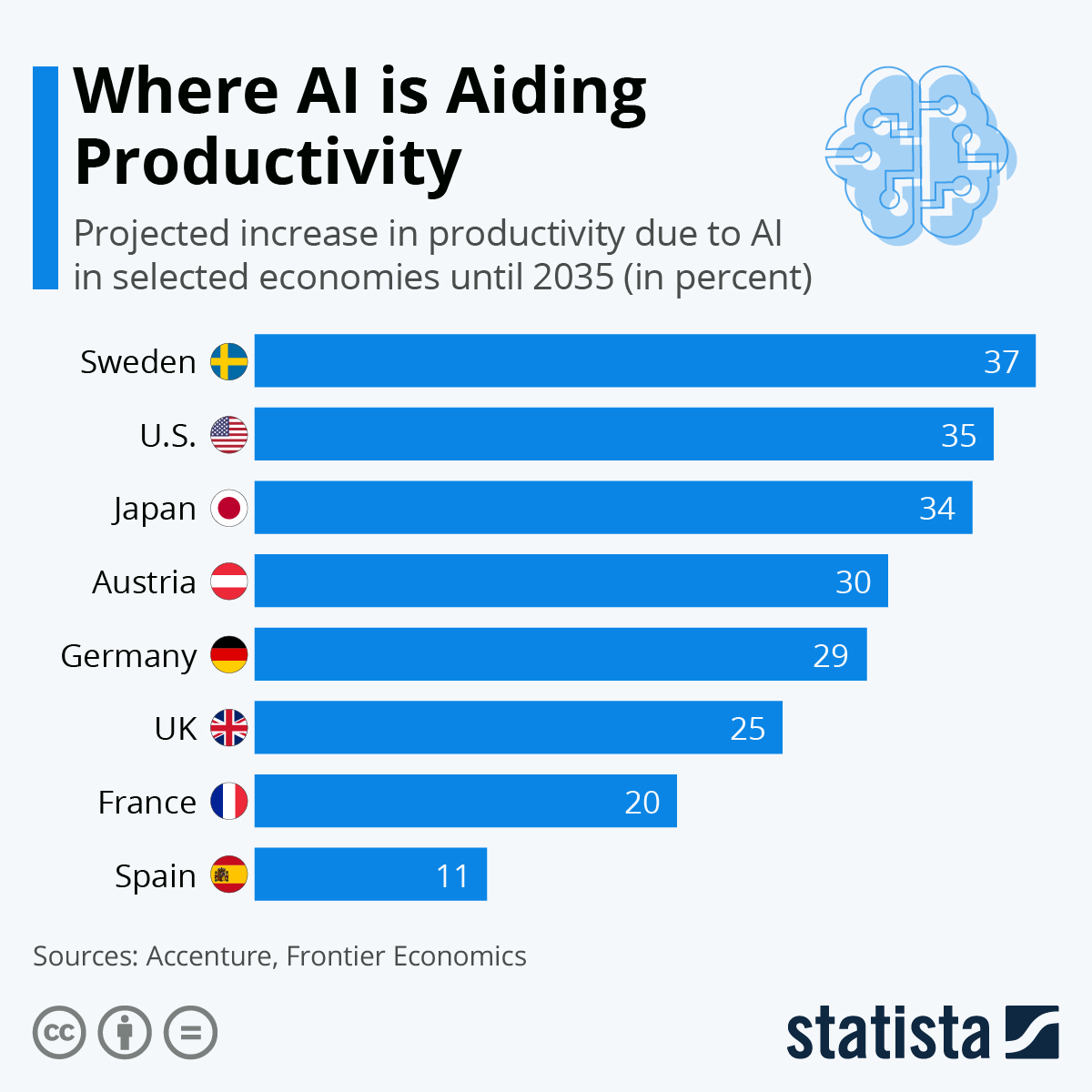
- AI copilots improve productivity by 25–55%
- Support teams handle tickets 30–40% faster
- Sales teams book 25–35% more meetings
- Product teams reduce backlog review time by 50–60%
- Knowledge retrieval becomes 5× faster
These numbers align with emerging AI productivity benchmarks.
🏁 Conclusion — An AI Copilot Is Your New Competitive Advantage
AI copilots are not futuristic — they are here, working in real teams, making real impact.
They don’t replace people.
They remove friction.
They elevate productivity.
They amplify human creativity.
When my founder friend said:
“I installed a teammate,”
he perfectly captured what AI copilots truly represent.